Visuals are an effective way to capture people’s attention when they scroll through their social media feed. People are more likely to stop and look at a graphic than a post of just words. Visual content drives both attention and retention. Visuals help people remember what they read; when paired with clear messaging, graphics can significantly increase reach and engagement.
One way to repurpose sermons is to make them into shareable graphics. Repurposing your sermons into graphics allows you to share your message beyond Sunday, motivate your audience, and broaden your audience reach. Below, we’ll discuss how you can easily repurpose your sermons into shareable graphics.
Why Shareable Sermon Graphics Matter
- They increase visibility – Blogs and posts that include images get significantly more views than text-only content.
- They improve retention – The brain stores visuals differently than text alone. Images + words = better retention.
- They are more shareable – Visual content is more likely to be shared, which means your church social media image will reach more people.
Step-by-Step: How To Turn a Sermon Into Shareable Graphics
With Sermon Shots, you can simply turn moments from your sermon into a graphic. The process is hassle-free and takes only a couple of minutes. Let’s go over how you can do this step-by-step.
1. Upload your sermon
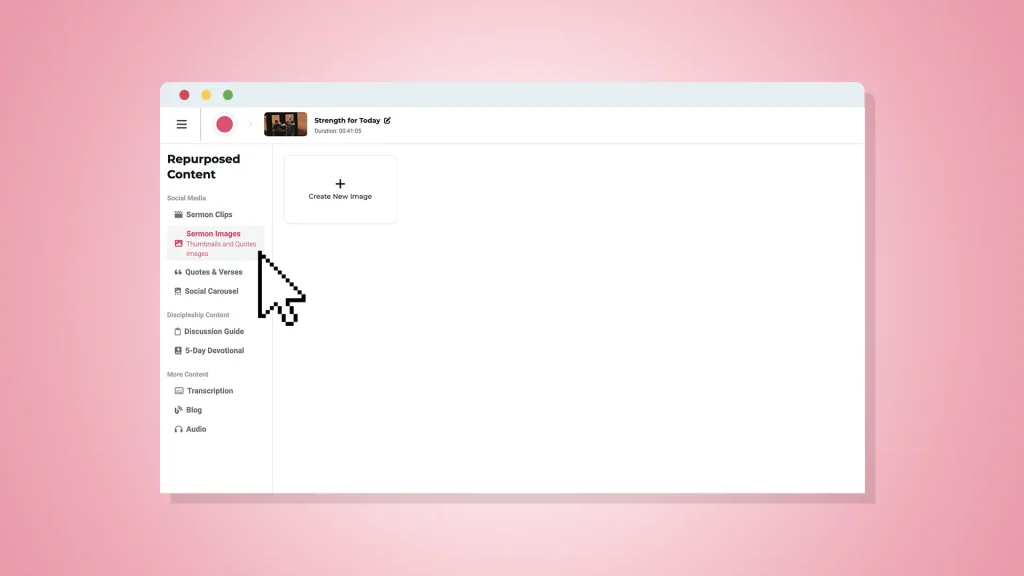
To begin, start on the Sermon Shots Dashboard. Either click on “upload video” to upload your sermon or choose a sermon you’ve already uploaded. On the left-hand side, click on “Sermon Images.” From there, choose whether you want to create a thumbnail or quotes and verses. For a shareable graphic, choose quotes and verses.
2. Choose a template

There are many templates to choose from that’ll make your graphic stand out. When you find a template you like, click on it and hit the “next button.”
3. Insert a snapshot

Find a moment where your speaker is expressive. You may view multiple options using the video timeline. When you see the moment you want to share, click the “Snapshot” button. If you want to remove the background, click “Remove Background” before you click on the “Insert Snapshot” button. Your newly created graphic is automatically inserted into your design.
4. Design the graphic
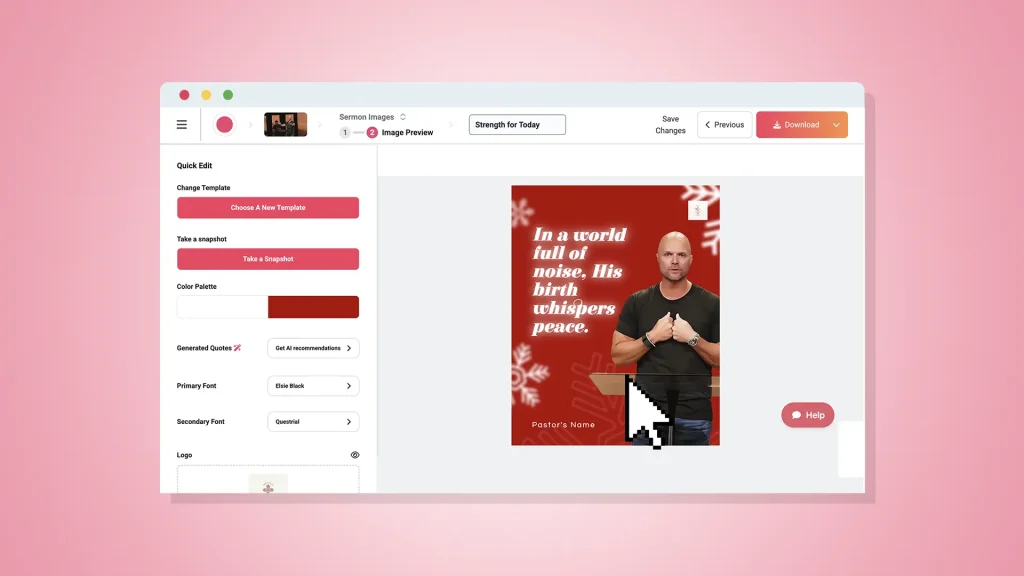
This is your chance to:
- Add text and change the font
- Adjust the color palette
- Add a logo
5. Download the graphic
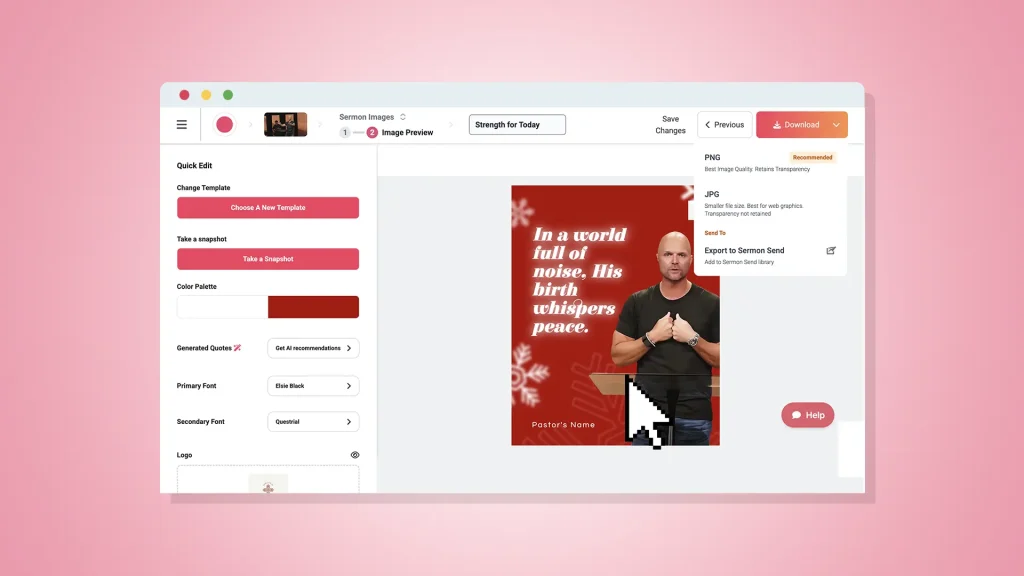
When your graphic is to your liking, click on the “download” button on the top right.
Best Practices for Shareability & Engagement
- Pair visuals with captions that invite folks to leave a response – Ask one question in the caption to prompt comments and shares.
- Monitor what posts get the most traction – Repurpose formats that seem to get the most shares and likes.
- A clear and high-quality quote image with not a lot of text – If your image has text, make it short, to the point, and readable.
Final Thoughts
Your message can be shared far past Sundays. Repurposing it into shareable graphics is a great way to do that.
When you’re ready to make repurposing effortless, Sermon Shots is here to help. You can repurpose your sermon into a graphic in no time. This way, your sermon travels further than ever.
FAQs
Q: How often should we post sermon graphics?
A: Consistency matters. Start with 2–4 posts per week: one sermon quote image, one sermon clip, and a midweek encouragement. However, Sermon Shots makes it really simple to have 1-2 posts a day.
Q: Should I add Bible references to every graphic?
A: Yes! If the text comes from Scripture, include the reference. It encourages deeper reading and lends credibility.
Q: How does our church avoid looking too “salesy” or promotional?
A: Prioritize encouragement over promotion. When you promote events or sermons, keep it brief.